How to Check Task Cycle Time in CODESYS
November 3, 2026
Compare two methods for measuring actual controller task timing
By Zhou Gong, Control Engineer at Festo
Learn how to measure actual task cycle time in CODESYS and choose the right method for precise controller performance checks.
Introduction
Task cycle time is one of the practical values engineers can use to understand how a controller application behaves during runtime. If a task takes longer than expected, it can affect process timing, synchronization, troubleshooting, and system stability.
CODESYS is a development environment for programming controller applications according to IEC 61131-3. It is used in automation and control systems where tasks need to run reliably within defined timing conditions.
In CODESYS projects, monitoring actual task cycle time can help engineers optimize performance, identify bottlenecks and detect timing behavior that may affect the machine sequence. This is especially important when control tasks, communication tasks or motion-related functions need to stay within a specific timing window.
This tutorial shows two ways to measure actual task cycle time in CODESYS:
- Using the built-in TIME() function
- Using the CmpIecTask library
Both methods can be useful. The right choice depends on the precision you need and how deeply you want to analyze task behavior.
Why task cycle time matters
Task cycle time describes how long a specific task or operation takes inside a control system. In a controller application, this value helps you understand whether the code is running within the expected timing range.
Monitoring task cycle time can support several engineering tasks:
- Checking whether a task stays within its configured cycle time
- Identifying code sections that increase runtime
- Detecting unexpected timing variations
- Supporting troubleshooting during commissioning
- Improving process synchronization
- Helping stabilize controller behavior
A stable task cycle time does not solve every control issue, but it gives engineers a useful starting point. If the actual cycle time is longer than expected or varies strongly, the application may need closer analysis.
What task cycle time means in CODESYS
In CODESYS, a task defines when and how a program or function is executed. The task cycle time is the time required to complete that execution.
For example, a cyclic task may be configured to run every few milliseconds. If the code inside the task takes too long, the controller may not complete the task within the expected timing window. This can affect performance, process synchronization or motion behavior.
Measuring task cycle time can be challenging because the actual value may be influenced by several factors:
- System load
- Network latency
- Hardware performance
- Task configuration
- Software architecture
- Communication behavior
- The amount and structure of code inside the task
That is why the measurement method is important. A simple timing method may be enough for basic checks. A more precise method may be needed when microsecond-level timing or task-specific information is required.
Method 1: using the TIME() function
One simple way to measure elapsed time in CODESYS is to use the built-in TIME() function.
The basic logic is straightforward:
1. Capture the start time before the code section runs
2. Execute the code you want to measure
3. Capture the end time after the code section has run
4. Subtract the start time from the end time
5. Use the result as the measured elapsed time
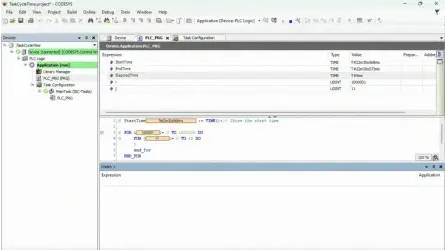
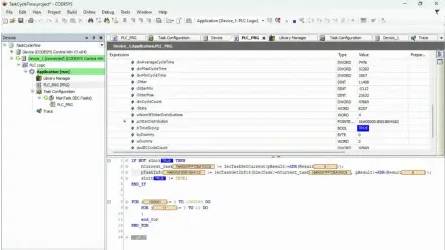
In the example, two FOR loops are used to simulate a time-consuming task. The TIME() function captures the time before and after the loop section, and the difference between those values gives an estimated task runtime.
This method can be helpful when you want a quick indication of how long a code section takes.
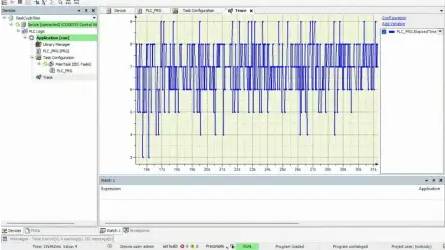
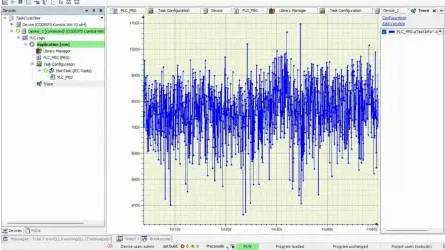
The example shows a measured task cycle time that usually ranges from 6 to 8 milliseconds. A trace can be added to monitor the measured variable over time. In the example, the cycle time occasionally jumps to 10 milliseconds.
That variation matters. If a soft motion task is configured with a cycle time of 4 milliseconds or less, exceeding that configured cycle time may cause exceptions. This makes task timing especially relevant for applications with tight motion or synchronization requirements.
Limitations of the TIME() function
The TIME() function is useful because it is simple. It requires little code, is easy to understand, and can be added quickly to an existing project.
It can be a good option when:
- You need a quick timing check
- Millisecond resolution is sufficient
- You want to measure a specific code section
- The application does not require high-precision timing data
However, the TIME() function also has limits. It provides values with millisecond-level resolution. That may not be precise enough for applications that need microsecond-level analysis.
This method also requires manual time tracking. You need to define where the measurement starts, where it ends, and how the elapsed time is calculated. This is acceptable for simple checks, but it can be less convenient when you need task-specific runtime information across a larger program.
For more precise task cycle time measurement, the CmpIecTask library is usually the better option.
Method 2: Using the CmpIecTask library
The CmpIecTask library is included with CODESYS. This library provides functions for accessing information from the IEC Task Manager.
Once the library is added to a CODESYS project, initialization requires only a small amount of code. After initialization, the program can access a structure with detailed task information, including values such as actual task cycle time and average cycle time.
This approach is more task-specific than manually measuring time before and after a code section. Instead of creating your own timing logic, you use the task information provided through the library.
In the original example, the same simulated working load is used so the measurement methods can be compared. The difference is that the CmpIecTask library handles the task cycle time information more directly.
Advantages of the CmpIecTask library
The CmpIecTask library offers several advantages when you need more precise task timing.
First, it can be integrated flexibly into different parts of the program. This makes it easier to access task information without manually placing start and end time measurements around every code section.
Second, the library manages the recording and calculation of task cycle time information. This reduces manual effort and lowers the risk of errors in the measurement logic.
Third, the library provides values with microsecond-level resolution. This is more precise than the values obtained with the TIME() function and can be important for applications with tighter timing requirements.
The main drawback is that the library must be added to the CODESYS project. However, for many applications, that is a small trade-off compared to the additional precision and task-specific information it provides.
Which method should you use?
Both methods can help you understand task timing, but they are not equally suited for every situation.
Use the TIME() function when you need a simple, fast check, and millisecond-level resolution is enough. It is easy to implement and useful for basic timing comparisons.
Use the CmpIecTask library when you need more precise task information, want to avoid manual timing logic or need microsecond-level resolution for performance analysis.
For motion tasks, synchronization tasks or controller applications with tighter timing requirements, the CmpIecTask library is usually the better choice.
Quick comparison
Requirement
Simple setup
Minimal code
Manual start and end measurement
Task-specific information
Resolution
Best fit
TIME() function
Strong
Strong
Required
Limited
Milliseconds
Quick checks
CmpIecTask library
Moderate
Moderate
Not required in the same way
Strong
Microseconds
Precise task cycle time analysis
Practical Festo note
CODESYS task timing is especially relevant when controller performance, motion behavior, or machine synchronization must be evaluated during commissioning or troubleshooting.
Within the Festo software environment, CODESYS can be part of a broader engineering and control workflow. Festo AX Controls supports deterministic real-time control in standard programming according to IEC 61131-3, including CODESYS, and also supports high-level languages such as C/C++, C# and Python.
Festo Automation Suite supports commissioning, programming, and diagnostics. It can transfer AX Controls devices such as CEPE from the topology into the CODESYS programming environment without additional configuration steps, so users can continue directly with the machine sequence.
Use this tutorial as a practical CODESYS method for checking task timing. Then continue with the Festo software, licensing, or learning resource that fits your next engineering step.
Key takeaways
- Task cycle time shows how long a specific task or operation takes inside a control system
- Monitoring task cycle time helps engineers optimize performance, detect bottlenecks and improve system stability
- The TIME() function is easy to use and quick to implement, but it provides millisecond-level resolution
- The CmpIecTask library provides task-specific information and microsecond-level resolution
- Use the TIME() function for simple checks and the CmpIecTask library for more precise cycle time analysis
- Tight motion control or synchronization tasks often require more careful consideration of actual task timing
- Festo software and support resources can help users move from CODESYS troubleshooting to commissioning, licensing, and edge-control implementation
More Information
Explore software options for edge control from Festo and connect your controller applications with the right automation software. Find CODESYS learning options or Explore edge control software